I have been playing with Visio since 93 when customer support was on CompuServe. With Visio, I could create Business diagrams easily. Before that I was creating the diagrams by using code, including COBOL. Around version 3, Visio was the first non MS company to fully implement VBA, including the macro recorder. So since then,Continue reading “History of Visio Visual Section Shapes”
Category Archives: Shapesheet
Updated Custom Property Dump

(AKA Shape Data Dump) Decades ago, I created a simple VBA script to dump a shapes Custom Properties (Aka Shape data). If I wanted to include the Custom Properties Section in documentation I had to run Show Shapesheet and take a screen capture. It was just an image. Since Visio shapes are more flexible inContinue reading “Updated Custom Property Dump”
Ugly Visio Shapes

Not all Visio shapes are pretty when they wander away from normal standards or have unnecessary embellishments, the shapes become ugly. With Visio shapes, even the shapes can be internally beautiful. Unnecessary code is ugly because it is distracting Electrical engineering shapes The Electrical engineering shapes were redone. I was interested in electronics in highContinue reading “Ugly Visio Shapes”
Further Around the Bend
If you want to fill a shape, the basic rule is that you need consecutive line segments that form a closed loop. You can also go into the shapesheet and set the NoFill cell of the Geometry section to False. In this case, the numbers are the shapesheet row numbers, the green arrows show theContinue reading “Further Around the Bend”
Visio Shape Explorer
To be able to create the Visio Visual Section document meant, I needed to mine the information from Visio shapes. The easiest way was to let loose CellsSrc() on a series of shapes and let the code create a file of what it found. Visio is big on using enumerations, but they are not goodContinue reading “Visio Shape Explorer”
List Container
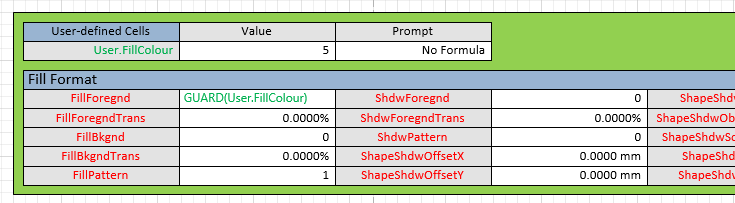
I did not have a good spring healthwise. The worst part was not having access to a Visio machine. Thanks to the prompting from a friend, I have made it to my Visio machine to write about Visio. One thing I seem to have overlooked in my quest for being able to create Visio sectionContinue reading “List Container”
Refining the Shapesheet Section template

Now that I have put the Braille shapes to bed, back to the Shapesheet Section template with a quicky post. I started the Shapesheet Section stencil to help with documentation that involves the Shapesheet. I am constantly saying Visio shapes are more than clip art. When it comes to adding Shapesheet sections to documentation, VisioContinue reading “Refining the Shapesheet Section template”
Visio Braille Part 2

Before posting my Braille shape, I decided to embellish it first. The original shape was a single shape that had a Geometry section (Ellipse) for each of the dots (pips) and user cells User.Dot1-Dot6 contained the list of characters the shape represented. The Ellipses are independent of the shape and positioned by the X,Y ofContinue reading “Visio Braille Part 2”
Visio Braille

I was getting withdrawal symptoms from not blogging about Visio or creating a new Visio shape for a while. I have not done this all year. Visio is a graphics package and it may seem strange that I created a shape for the blind. The shape is simple and is a good example of howContinue reading “Visio Braille”
Handling the Curves
Let us explore how Visio handles curves. This is a normal rectangle. You can add rounded corners by selecting the Format Shape Dialog. From the Home tab chose Line from the Shape Styles section, then choose Line Options from the Line dropdown. That will bring u the Format Shape dialog. Near the bottom is theContinue reading “Handling the Curves”
 john Visio MVP